Followers

Showing posts with label Tech integration. Show all posts

Thursday, August 10, 2017

I never knew that coding could be so easy.


I had the pleasure of attending a Coding Academy given by RePublics CS using the free web based software Scratch created by MIT. RePublics created lesson plans for teachers to implement a skills based and best practice pedagogy. The training itself was an amazing two day training where were leaned both the scratch and RePublics CS platforms. For the rest of this post I would like to focus on the Scratch platform.

Scratch is a free web based coding platform that was created by MIT and designed for students age 8-16 but can definitely be used for ages outside that range. I have very little experience with coding before I attended this professional development. When day two of this two day training had concluded, I was so much more confident and at ease about the entire process of coding. Here is a snap shot of an artifact that I created.


I will leave you with this thought, coding is something that you can do, and scratch makes it easy!

Tuesday, March 28, 2017

You have a 3D printer, now what?

Administrators, teachers, and students alike are eager to provide 21st century learning tools onto the campus and in classrooms. If you are thinking about purchasing or already have a 3D printer the million dollar question is, "what do I do with it" other than the obvious. What are the educational benefits that can be gained from having this relatively expensive piece of hardware.

I am remined of a Wendy's commercial from my childhood that asked, "where's the beef?!!" In this instance, lets ask, "where's the pedagogy?" I was very happy to meet up with my amazing teammate who informed me that she found a free web based software called Tinkercad that can be used to produce the 3D file type (Stl) needed to print a object. Tinkercad is an easy to use web based software that with a little teacher support even a kindergartener could use successfully.

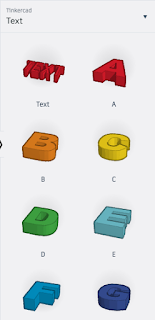
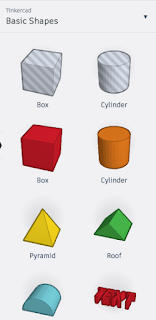
With the use of basic shapes a student can create anything. Here are a few that can be used:


Using a combination of these shapes student can create 3D objects and save them as Stl files to print on a 3D printer.

I hope you have the chance to create your own object and print it!

Monday, October 10, 2016

#Innovator's Mindset MOOC- Oct.8- Oct. 15

In part III, Chapter 3 of George Couros's book, "The Innovator's Mindset, we are challenged to empower our students by learning who they are and what they are passionate about, and then generating learning experiences that allow for them to integrate their interests and passions into creating something that can demonstrate learning. If we as teachers want to truly empower our students we need to teach to our student's strengths. "To create a culture where innovation flourishes, we have to realize that, in many cases, we already have everything we need, we just need to tap into those resources" (Couros, 2015). I can not recall the countless times my students have taught me something. In those instances, both my student and I are so proud, I in them, and them in their own mastery and insight! Providing the context and opportunity to engage a student's passion will yield deep critical thinking and masterful creations far beyond a multiple choice assessment.

I was intrigued by the study that was conducted by Tom Rath. He found that 40% of employees would be actively disengaged if their boss ignored them, 22% if the boss focused on the weaknesses, and an astounding 1% actively disengaged if the boss focused on the strengths alone. Can you imagine how this might translate into 99% active engagement just by a teacher focusing on the strengths of students! Couros makes an insightful point in asking why we would take an elective away from a student (presuming that the student might be really good or truly enjoy that elective) to practise more of what they need help in? This leads to an inadvertent punishment and will most likely result in increased frustration and hostility in the weak subject.

I enjoyed the quote that Couros included from Joesph Joubert, "To teach is to learn twice". It reminded me of an equally powerful quote by Jennifer Hogan to the left. If we forget what it was like when we were students then we are not going to truly connect with ours. we must continue to learn and to expand what we can offer to our students. If we become static or complacent then we are actively holding our student's back. Think about that for a moment because it has serious implications. Choosing to continue without growing or expanding your knowledge will cause your student's to be held back. It makes me think of a great rock protruding in the middle of a rushing stream. The water rushes past and for the swimmer who gets to close to the rock will be trapped by the currents that are forced continually inward. It is not without great force that the swimmer escapes, having to expend tremendous energy that could have been spent swimming further onward.


References:

Couros, G. (2015). The innovator’s mindset: Empower learning, unleash talent, and lead a culture of creativity. United States: Dave Burgess Consulting.

Friday, March 11, 2016

Flipped classroom


I have just started using apps on my iPad that allow students to record themselves as they solve a problem orally. I use notability and educreations. I really like these two apps. I think that notability is more sophisticated and dynamic. There are more options you can use to format a document or create a document.

I am curious, do you use some kind of application or allow your students to record themselves for their benefit or for the benefit of others that you teach?

I have a daily warm-up that my students begin immediately upon entering my class. I will usually rotate through students who I choose to demonstrate how to solve the warm ups and I will play the recordings for subsequent class periods. I will also dedicate the last few minutes to discuss homework assignments and allow volunteers to record how they approached solving a problem and use it in attachments in emails that I send home. Usually if several students have the same questions I know that the majority of students will when they reach that part on the homework (usually the night before it is due).

I found this article on how teachers can encourage students to record tutorial videos for other students and it made me wonder if any of you have experience with this or even flipped classrooms? If you have not heard the term before a "flipped classroom" is one where the students are asked to research a topic via online video or website and then come to class with some idea able to discuss the topic so that the teacher serves as a discussion facilitator. In my school I can not rely on this system because not all of my students have access to internet at home. 

http://ww2.kqed.org/mindshift/2014/11/03/the-benefits-of-students-teaching-students-through-online-video/

Please check out the article and tell me what you think.

1) Do you use any peer tutorial systems in your class?


2) Do you use technology or recording software to facilitate your tutorials?